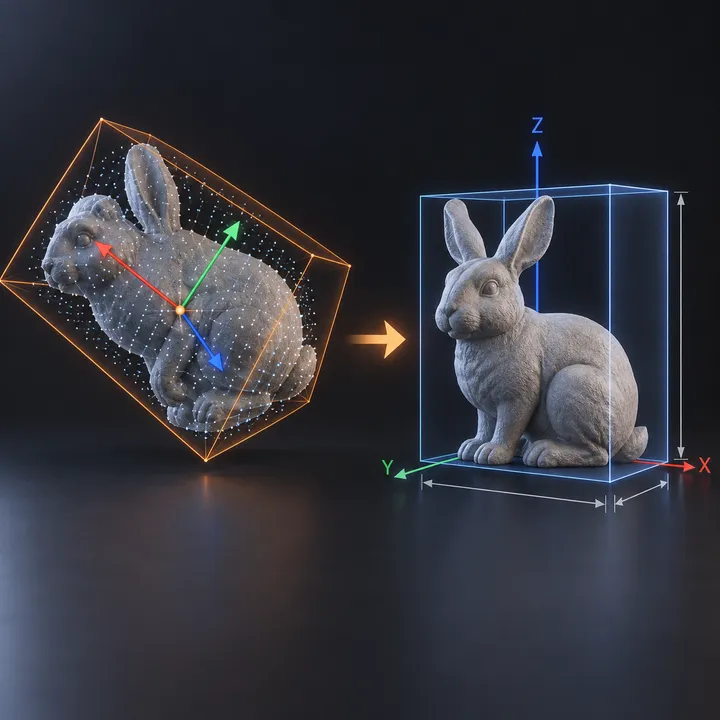
Asset overview
Understand the setup.
Then make it your own.
Align Pro is a Blender Geometry Nodes asset in OmniKit’s modeling collection.
MESH INPUT: drop on a mesh, or feed mesh geometry to Geometry. Apply object scale for predictable distances. | Align Pro - finds a mesh's own principal axes and squares it to the world. Builds the covariance matrix of the point cloud, extracts the dominant axis by power iteration, deflates and repeats for the second, and crosses for the third - so it works on any shape, not just boxes. Outputs the frame as a Rotation, the centre of mass, the extent along each principal axis, and an oriented bounding box that hugs the shape far tighter than an axis-aligned one. Use it to square up scanned or imported meshes, orient scattered instances along their long axis, or get a real OBB.
Its exposed inputs include Align, Centre It, Iterations, Show Box. Review the control reference below to plan a suitable setup.
Source and setup notes
Source node name: OMNI - Align Pro
Collection: 22 Geometry Nodes/Attribute/Named Attributes
Structural inspection used Blender 5.2.0 LTS. Other releases and render engines require separate checks.
How to approach this asset
- Check the source notes for the expected mesh, curve, field, shader or World context.
- Start with a disposable scene and a suitable input. Inspect required object, material or collection inputs.
- Adjust one documented control at a time. Evaluate the result before using it in a production project.